


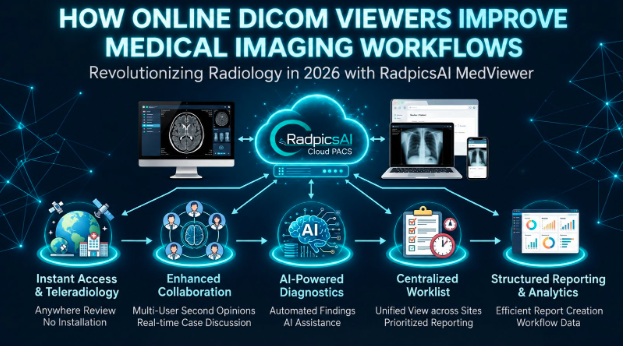
There is a moment every radiologist and clinician has experienced. A patient arrives for a consultation. Their scan was done at a different hospital, three weeks ago. The CD they were told to bring either never came, got scratched, or needs software to open that is no longer installed on any of the clinic's computers.
The consultation gets delayed. The scan gets repeated. The patient gets frustrated. And the referring doctor wonders why any of this should be this hard in 2026.
Online DICOM viewers exist to make that moment disappear. They are also doing something much bigger in the background quietly changing how medical imaging fits into everyday clinical workflows across hospitals, diagnostic centres, and teleradiology networks.
What is a DICOM viewer, and why does "online" matter?
DICOM stands for Digital Imaging and Communications in Medicine. It is the international standard format for storing and transmitting medical images every CT scan, MRI, X-ray, and ultrasound your hospital produces is a DICOM file.
A DICOM viewer is the software that opens, displays, and allows interaction with those files adjusting window levels, measuring structures, comparing series, and annotating findings.
Traditionally, DICOM viewers were desktop applications installed on specific workstations. If you needed to view a scan, you went to the workstation. If the workstation was occupied, you waited. If you were working from home or at a different site, you were largely out of luck.
An online DICOM viewer runs in a web browser. No installation. No specific workstation. Open the link, see the scan. From a laptop, a tablet, a phone, or a colleague's computer in a different city.
That shift from workstation-bound to browser-based is what makes the difference in a real clinical environment.
The workflow problems online DICOM viewers solve
Referral and second-opinion delays
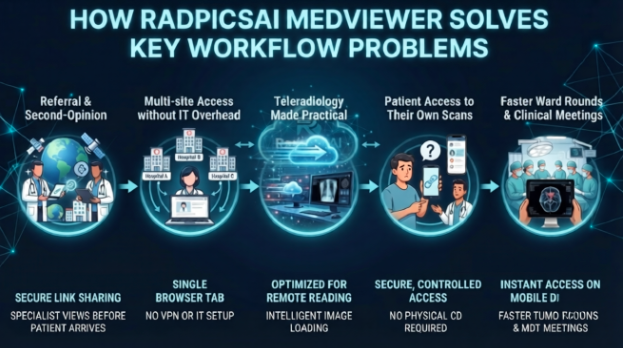
A patient referred from a small clinic to a specialist centre used to hand-carry a CD. Today, with a browser-based viewer like RadpicsAI's MedVIEWER, the referring doctor shares a secure link. The specialist opens the scan before the patient even arrives for their appointment. The consultation starts from an informed position, not from scratch.
Multi-site access without IT overhead
A radiologist covering three hospitals in a network used to need VPN access, remote desktop sessions, or physical presence. With an online viewer integrated into a cloud PACS like MedPACS, they open any study from any of those sites in one browser tab. No VPN setup. No call to IT. No workstation dependency.
Teleradiology made practical
Teleradiology only works when remote radiologists can access images as efficiently as on-site ones. An online DICOM viewer is what makes that possible. RadpicsAI's MedVIEWER is built specifically for this, optimised for remote reading sessions, with intelligent image loading that prioritises the most diagnostically relevant series first so radiologists are not waiting for a 600-image CT to fully load before they can start reading.
Patient access to their own scans
More and more patients want to access their imaging. A second opinion from a specialist in another city, an overseas consultation, a patient who simply wants to understand what their scan shows. All of these are easier when the patient has a secure link to their images rather than a CD that may not play.
RadpicsAI supports patient-facing image sharing with controlled access the patient gets what they need, the hospital retains full audit control over who accessed what and when.
Faster ward rounds and clinical meetings
A surgeon reviewing imaging before an operation should not need to request access to a specific workstation and wait for it to load. With an online viewer, they open the relevant study on the device in their hands, right there in the corridor or the conference room. Tumour boards, MDT meetings, and post-operative reviews all move faster when imaging is immediately accessible rather than logistically managed.
What features should a clinical-grade online DICOM viewer have?
Not every online DICOM viewer is built for clinical use. Some are designed for patients or for education. They open images easily but lack the tools a radiologist or clinician needs for diagnostic work.
A viewer built for clinical workflows should offer:
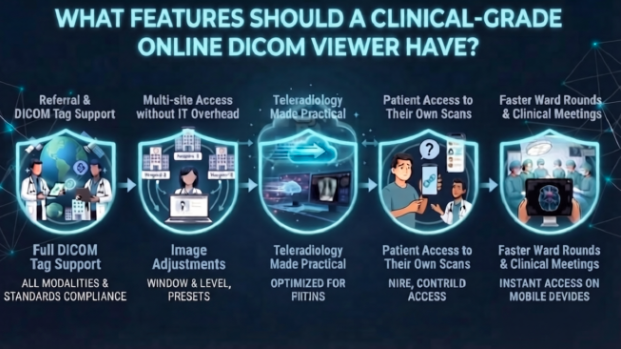
- full DICOM tag support across all modalities (CT, MRI, X-ray, ultrasound, mammography, PET)
- window and level adjustment with preset options
- measurement tools length, area, angle, density
- multi-series and multi-planar view with linked scrolling
- prior study comparison side by side
- annotation and reporting tools that connect to the worklist
RadpicsAI's MedVIEWER is integrated directly into MedPACS, which means images open with hanging protocols already applied, priors pre-loaded, and the reporting interface available in the same window. It is not just a viewer, it is the reading environment.
Security: the question that matters most
Medical imaging data is sensitive. The moment it lives in a browser rather than on a dedicated server inside the hospital network, the question of security becomes critical.
A properly built clinical online DICOM viewer handles this through:
- encrypted data transmission (HTTPS/TLS)
- role-based access controls so only authorised users open specific studies
- full audit logs of every access event
- time-limited or password-protected shareable links rather than permanent public URLs
What it should never do is store patient images on public servers, allow sharing through general-purpose file platforms, or generate links that can be forwarded without expiry.
RadpicsAI applies enterprise-grade encryption across all data in transit and at rest, with audit trails on every image access meeting the requirements for clinical use in Indian hospitals and aligning with international standards.
Online viewer vs. cloud PACS: understanding the difference
An online DICOM viewer and a cloud PACS are related but not the same thing.
A viewer opens and displays images. A cloud PACS stores, manages, routes, and archives them and includes a viewer as one of its components. Choosing just a viewer means you still need a separate system to store images, manage worklists, and handle reporting. Choosing an integrated cloud PACS like MedPACS means the viewer, the storage, the workflow management, and the reporting tools are all in one place.
For most diagnostic centres and hospitals, the integrated approach makes more operational sense. You manage one system, one login, and one support relationship rather than stitching together separate tools and hoping they work together.
How RadpicsAI's MedVIEWER fits in
MedVIEWER is RadpicsAI's browser-based DICOM viewer, built as part of the MedPACS platform. It is what radiologists use to read studies remotely, what referring doctors use to review imaging for their patients, and what patients use to access their scans from home.
It supports all standard modalities, opens studies with hanging protocols applied automatically, loads priors from the MedPACS archive, and connects to the reporting interface for radiologists. It works on any modern browser, on any device, without installation.
For teleradiology operations covering multiple centres which is an increasingly common model in India MedVIEWER handles the image access layer while MedPACS handles routing, worklist management, and archiving. The two work together as a single system rather than separate tools bolted together.
The bottom line
Online DICOM viewers did not replace traditional radiology workstations overnight. But they have made clinical imaging accessible in ways that desktop-only viewers simply cannot across sites, across devices, for radiologists, clinicians, and patients alike.
For hospitals dealing with referral delays, for teleradiology networks covering multiple centres, for diagnostic centres that want patients to receive their results digitally rather than on a CD an online DICOM viewer is no longer a nice-to-have. It is the baseline for running an efficient imaging workflow in 2026.
FAQs
Frequently Asked Questions
What is an online DICOM viewer?
It is a browser-based tool for opening, viewing, and interacting with medical images in DICOM format without needing to install any software on the device. Studies open from a secure link or worklist directly in the browser.
Is an online DICOM viewer safe for patient data?
Yes, when using a clinical-grade platform with encrypted data transmission, role-based access controls, audit logs, and time-limited sharing links. Platforms designed for clinical use handle patient data very differently from consumer file-sharing tools.
Can online DICOM viewers handle large CT or MRI studies?
Yes. Good platforms use progressive loading, the most important images load first so reading can begin immediately, with additional series loading in the background. RadpicsAI's MedVIEWER is optimised for this, particularly for remote reading over variable network connections.
Do I need a cloud PACS to use an online DICOM viewer?
Technically no, but practically yes for clinical workflows. A viewer opens images; a cloud PACS stores, manages, and routes them. An integrated platform like MedPACS combines both, which is more efficient than running them separately.
Can patients use an online DICOM viewer to access their own scans?
Yes. RadpicsAI supports patient-facing image sharing through secure, time-limited links. Patients can open their scans in MedVIEWER without creating an account or installing anything.
Does MedVIEWER work on mobile devices?
Yes. MedVIEWER is browser-based and works on tablets and phones. For detailed diagnostic reading, a monitor with adequate resolution is recommended but for quick review, consultation, or sharing, mobile access works well.
How is an online DICOM viewer different from a desktop PACS viewer?
A desktop viewer is installed on a specific workstation and requires local access. An online viewer works in any browser, from any location, without installation making it essential for teleradiology, multi-site access, and patient sharing.
Can referring doctors use MedVIEWER without a RadpicsAI subscription?
Yes. Referring doctors can be given controlled access to specific studies through secure shared links, without needing a full platform subscription. Access permissions are managed by the hospital or diagnostic centre.