


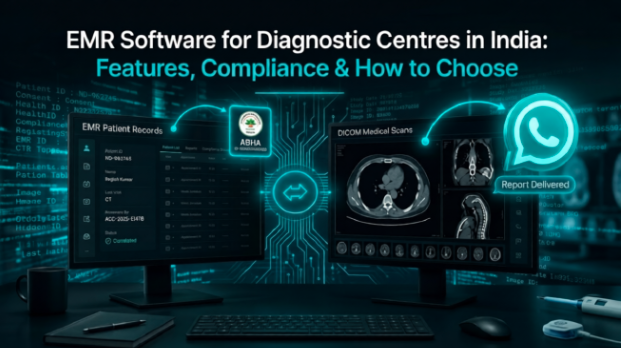
Running a diagnostic centre in India has always meant managing a lot of paper. Registration forms. Appointment books. Lab request slips. Radiology reports filed in labelled folders. Billing records kept in a separate register. Every piece of patient information is in a different place - and none of it is easy to find when someone calls asking about a test from three months ago.
That system worked, after a fashion, for decades. But in 2026, it is under real pressure.
The Ayushman Bharat Digital Mission is making digital health records a national priority. PMJAY-empanelled facilities are required to be ABDM-compliant. NABH accreditation increasingly expects electronic records. And patients - especially in urban and semi-urban India - now expect to receive their reports on WhatsApp, not on a sheet of paper they have to collect in person.
If your diagnostic centre does not have EMR software yet, or if you have something that does not quite fit your workflow, here is what you need to know before making a decision.
What is EMR software - and why does a diagnostic centre need something specific?
EMR stands for Electronic Medical Record. At its most basic, it replaces paper files with a digital system that stores patient information - registration details, visit history, test requests, reports, and billing - in one searchable place.
But here is the thing: a diagnostic centre's needs are genuinely different from a GP clinic or a 200-bed hospital.
Diagnostic centres see high volumes of patients who are not regular attendees. Someone comes in for a CT scan, perhaps referred by a doctor they see in a different city. They may never return. Or they return eight months later and expect their prior report to be on record. Imaging reports need to connect precisely to the PACS where the actual scans are stored. Billing needs to happen at the front desk, quickly, correctly.
A generic hospital EMR handles ward rounds, discharge summaries, and multi-day inpatient care. That is not your workflow. What you need is an EMR designed - or at minimum, configured - for the pace and structure of a diagnostic centre.
RadpicsAI's MedCARE module is built for exactly this context. It integrates appointment management, patient records, and radiology reporting in a single platform that connects directly to MedPACS - so imaging and patient records are one system, not two separate ones being manually synchronised.
The features that actually matter
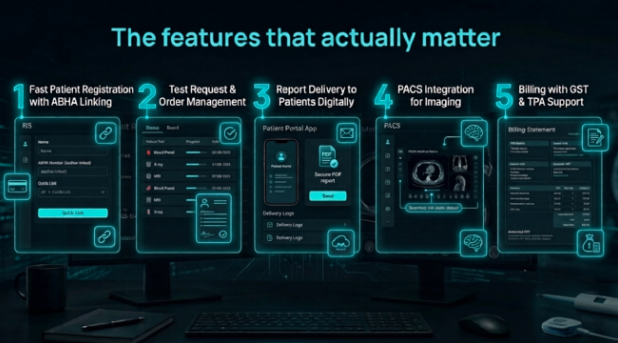
Fast patient registration with ABHA linking
Patients who have visited before should be found in under ten seconds. New registrations should take under a minute. And the system should support ABHA number linking from the moment of registration - not as an add-on that requires a separate process.
Test request and order management
When a doctor refers a patient for an MRI or a blood panel, that request should flow digitally to the right department inside your centre without a paper slip changing hands. Tracking the status of pending tests - and knowing when they are complete - should not require phone calls between departments.
Report delivery to patients digitally
Your patients should receive their completed reports - whether from radiology, pathology, or any other diagnostic - via WhatsApp, email, or a patient portal. The days of printing, stamping, and handing over a physical report are not over, but they should not be the only option you offer.
PACS integration for imaging
If your centre does radiology, this is non-negotiable. Your EMR and PACS must talk to each other. A radiologist signing off a report in PACS should have it automatically filed against the patient's EMR record. If they do not integrate, you have duplicate data entry, reporting gaps, and staff doing the same work twice.
This is one of the clearest advantages of RadpicsAI's integrated approach. MedCARE and MedPACS are built on the same platform. A report signed in the PACS appears in the patient's record instantly - no manual transfer, no copy-paste.
Billing with GST and TPA support
Diagnostic centres typically handle a mix of cash patients, TPA-billed insured patients, and corporate package clients. Your billing module needs to handle all three, generate GST-compliant invoices, and reduce the risk of billing leakage - tests ordered but not billed, discounts given without authorisation.
Reporting and analytics
How many patients did you see this week? Which test types are growing fastest? What is your average report turnaround time? A good EMR gives you this data automatically. You should be managing your centre based on actual numbers, not approximations.
ABDM compliance: what it means in practice
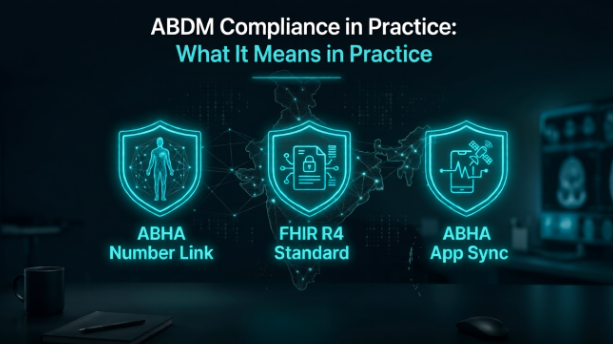
ABDM - the Ayushman Bharat Digital Mission - is India's national digital health infrastructure. The core idea is that every patient must have an ABHA number, a 14-digit health ID that links their medical records across different providers, with their consent.
For diagnostic centres, ABDM compliance means three specific things: your system can create and link ABHA numbers for patients; reports are stored in FHIR R4 format, the international standard for health data sharing; and patients can access their own records through the ABHA app.
This matters beyond just ticking a regulatory box. PMJAY-empanelled centres must comply. Support ABHA-linked digital health records and access. And as more patients come with ABHA numbers already set up, a centre that cannot link them is already creating friction in the patient experience.
If your current software cannot link ABHA numbers or export records in FHIR format, it is already behind the curve.
Five questions to ask any vendor before signing
1. Does it integrate with your PACS?
If you do radiology, this is the most important question on the list. Verify integration specifically, not in general - ask how a radiologist's signed report flows into the patient record, and see it demonstrated in the demo.
2. Which ABDM milestones does it actually support?
Some vendors claim ABDM compliance without supporting all three milestones (M1, M2, M3). Ask specifically which milestones are live, not planned, and whether the system can generate FHIR R4 records today.
3. How does report delivery to patients work?
Check whether WhatsApp delivery, email, and a patient portal are included in the subscription price or charged separately. These are not luxuries - they are what patients expect.
4. Does it handle your billing scenarios?
If you have TPA empanelments, test them specifically during the demo. Do not assume billing complexity is covered without running through your actual scenarios.
5. What does support look like after go-live?
Implementation is often straightforward. The real test is what happens six months later when something breaks at 9am on a Monday and you have a queue of patients waiting. Ask specifically about support response times and whether support is available in your language and time zone.
What about the cost?
EMR pricing in India varies widely. Free open-source options exist but require significant IT expertise. Subscription-based cloud platforms are generally the right fit for diagnostic centres - lower upfront cost, no server maintenance, and updates that happen without requiring your involvement.
For centres already on RadpicsAI for radiology, adding MedCARE is straightforward - it is part of the same platform, with the same login and the same support team. There is no separate vendor to manage and no integration project to run.
The bottom line
The paper-based diagnostic centre is becoming harder to run - not because of any single rule, but because of a convergence of factors: patient expectations, ABDM requirements, NABH accreditation standards, and the plain operational efficiency of having information in one searchable system.
Choosing the right EMR is not about finding the most feature-rich software. It is about finding the one that fits your actual workflow, integrates with your imaging system, meets compliance requirements, and comes with support you can reach when you need it.
For diagnostic centres that do radiology, the strongest starting point is a platform where EMR and PACS are already integrated. That is exactly what RadpicsAI provides.
FAQs
Frequently Asked Questions
Does a small diagnostic centre really need EMR software?
Yes. Even a small centre benefits from digital patient records, faster billing, and digital report delivery. ABDM compliance requirements also apply regardless of size if you are PMJAY-empanelled or seeking NABH accreditation.
What is ABDM compliance and why does it apply to my centre?
ABDM compliance allows your centre to link patient records to ABHA numbers, participate in the national health exchange, and receive Digital Health Incentive Scheme payments. All PMJAY-empanelled centres are required to comply.
Can RadpicsAI's MedCARE handle both EMR and radiology reporting?
Yes. MedCARE integrates directly with MedPACS - radiology reports signed in the PACS are automatically linked to the patient's EMR record with no duplicate entry.
What is FHIR and why does it matter?
FHIR (Fast Healthcare Interoperability Resources) is the international standard for health data exchange. ABDM mandates FHIR R4 format for record sharing. Software that does not support it cannot participate in India's national health network.
How long does EMR implementation take?
For cloud-based platforms, basic setup can be done in a few days. Full configuration - including ABDM integration, billing setup, and staff training - typically takes one to three weeks depending on the centre's complexity.
Does EMR software work without the internet?
Most cloud-based EMR platforms require a connection. For reliable operations, a backup internet connection is advisable - particularly for centres that also use cloud PACS for imaging.
Can patients access their reports through the system?
Yes, on platforms that include a patient portal or WhatsApp and email delivery. RadpicsAI supports digital report delivery so patients receive results without needing to collect a printout.
Is NABH accreditation required before adopting EMR software?
No. EMR software is valuable regardless of accreditation status. But NABH accreditation increasingly expects electronic records, and having a well-configured EMR strengthens your application considerably.