


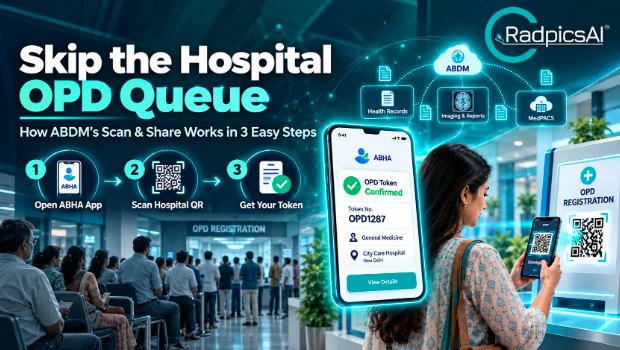
Picture this: you wake up feeling unwell and head to a big hospital. In the Outpatient Department (OPD) lobby, a long, winding queue is waiting for you, along with paper forms and a slow crawl toward a token number. By the time you see the doctor, you’re already tired. Now imagine scanning a QR code on your phone and getting your token in seconds. That is what ABDM’s Scan & Share offers. It is part of the wider push toward digital hospitals in India, the same shift that RadpicsAI supports with its MedPACS imaging platform and MedCARE™ patient workflow software.
What Is ABDM’s ‘Scan & Share’ Service?
The Ayushman Bharat Digital Mission (ABDM), run by the National Health Authority (NHA), is building a digital backbone for healthcare in India. Scan & Share is one of its most practical features for everyday patients.
In simple words, it is a QR-code-based way to register at a hospital OPD. Instead of writing your name, age, and address on a paper form, you scan a code with your phone. The hospital receives your basic details and gives you a token number for your visit.
You need an ABHA (Ayushman Bharat Health Account) to use it. Think of ABHA as a digital health ID. It links your health records in one safe place that only you control.
How ‘Scan & Share’ Works in 3 Easy Steps
The whole process takes about a minute. Here is how it goes at a hospital that supports the service.
Step 1: Open Your ABHA-Enabled App
Open a health app on your phone that supports ABHA. This can be the official ABHA app or another approved app, depending on the hospital. Log in with your mobile OTP or another method the app offers.
Do this before you leave home, or while you wait for a cab. Having the app ready means you won’t fumble with passwords at the counter.
Step 2: Scan the Hospital’s QR Code
Hospitals that support Scan & Share display a QR code near the OPD registration desk, at the entrance, or at billing counters. Open the scanner inside your app and point it at the code. The app will recognise the hospital and show you its name and the departments or counters available.
Step 3: Share Your Details and Get Your Token
Your app will ask whether you want to share your basic profile with the hospital. This includes details like your name, age, gender, and ABHA address. Tap the consent button to agree.
That’s it. The hospital’s system registers you, and a token number is sent to your phone. You can skip the paper form and wait for your turn instead of standing in a line.
Why Scan & Share Is Good for Patients
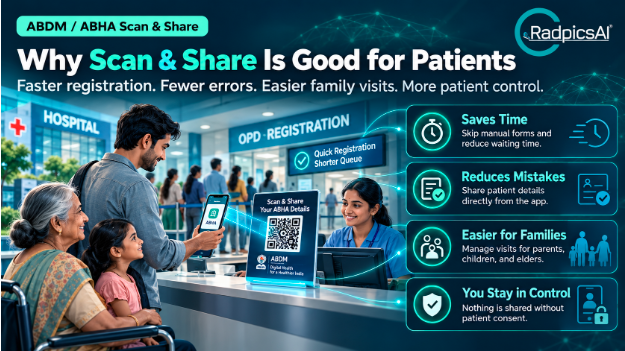
Anyone who has waited in an OPD queue knows how tiring it can be. Here is how this feature helps.
It saves time.
Registration is often the slowest part of a hospital visit. Skipping the manual form can cut a good chunk of that wait, especially at busy hospitals.
It reduces mistakes.
When a clerk types your details, a spelling error or a wrong phone number can slip in. Those small mistakes can cause real trouble later with billing, reports, or finding your records. Sharing details straight from your app keeps the information clean.
It’s easier for families.
Many people book visits for parents, children, or elderly relatives. Many ABHA apps let you manage several family profiles, so one person can handle registration for the whole household.
It gives you control.
The app asks for your consent before anything is shared. You decide what goes to the hospital.
Why It Matters for Hospitals Too
Hospitals gain just as much as patients. Fewer people crowding the registration desk means a calmer lobby and shorter waits. Front-desk staff can spend less time typing and more time helping patients who need support.
Standard digital registration also means every patient’s basic details arrive in the same format. This makes it easier to keep records tidy, and it prepares the hospital for the next steps in a patient’s care.
What Happens After Registration?
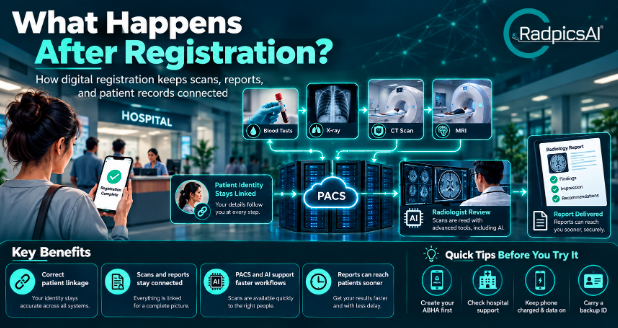
Getting your token is only the first step. The doctor may ask for blood tests, an X-ray, a CT scan, or an MRI, and this is where the hospital’s backend systems matter.
When registration is digital, your details stay linked to you across the hospital. Your scan, your report, and your doctor’s notes can all be tied to the right person without confusion. Imagine two patients with similar names getting their reports mixed up. Clean, digital identity helps prevent that kind of problem.
Behind the scenes, many hospitals use software to store and view medical images. This is called a PACS, short for Picture Archiving and Communication System. Radiologists use viewers to read scans, and newer tools use AI to help prepare reports faster. When your registration details flow into these systems properly, your scan and report reach the right file, and the report can reach you sooner. That is the kind of workflow RadpicsAI is built to support.
A Few Tips Before You Try It
- Create your ABHA first. You can make one using an ID such as Aadhaar, usually within a few minutes, through an approved app.
- Check that your hospital supports it. Not every hospital has switched on Scan & Share yet. Look for the QR code at the registration desk, or ask staff.
- Keep your phone charged and your data on. You’ll need a working internet connection to scan and share.
- Carry a backup. Keep your ID handy in case the hospital’s system is down or the network is slow.
FAQs
Frequently Asked Questions
1. What is ABDM’s Scan & Share feature?
It is a QR-code-based registration service for hospital OPDs. You scan the hospital’s code using your ABHA-enabled app, share your basic details, and receive a token without filling out a paper form.
2. Do I need an ABHA to use Scan & Share?
Yes. You need an ABHA number or address, which acts as your digital health ID. You can create one through an ABDM-approved app using documents such as your Aadhaar.
3. Is my medical data safe when I scan the QR code?
Scan & Share is meant for basic registration details, such as your name, age, gender, and ABHA address. Your health records are not shared unless you separately give consent. Always read the consent screen before you tap to confirm.
4. How does ABDM link with hospital imaging and diagnostic systems?
When you are registered with a verified digital identity, a hospital’s diagnostic and imaging systems can attach scans and reports to the right patient more reliably. Platforms like RadpicsAI help hospitals view images, prepare reports, and share them in an organised way.
5. Can I use Scan & Share for my family members?
In many ABHA apps, yes. You can add family profiles and register them one by one. Check that your app supports this before you visit.
Final Thoughts
Scan & Share may look like a small convenience, but it solves a real, everyday problem. It gives patients their time back, helps hospitals run smoother front desks, and builds the foundation for a connected healthcare system.
The next time you plan an OPD visit, set up your ABHA app first. A minute of preparation can save you an hour in the lobby. And for hospitals, adopting digital registration alongside modern imaging and workflow tools is a step toward care that is faster, cleaner, and easier on everyone.